Eleven devices, one working palette
A mechanical hum can hold a piece together while a few hand strikes pass between speakers. Bring in a bass line, let a string swell answer it, then fracture one bar of drums. Sound Lab brings those jobs into eleven original Max for Live devices: five Ambi instruments, three drum instruments, one drum effect, Fast Bass and Stringfield.
Each instrument is a self-contained AMXD. Use it directly on a track, or choose its optional eight-macro performance rack. No factory sample pack is needed. The instruments are synthesized designs, not sampled acoustic instruments or circuit-accurate recreations.
Download Sound Lab Save this guide
22 November 2026 · Early access · Requires Ableton Live with Max for Live. Includes eleven portable devices, eleven optional performance racks and a file manifest.
Install once; keep your existing sounds
- Extract the ZIP. Copy the included device folder directly into Live’s User Library. Merge with the existing folder if you already use our devices.
- Keep the folders together: Ambi Lab, Drum Lab, Synth Lab and Racks. The racks depend on the AMXDs in these locations.
- Load an instrument onto a MIDI track. Put Bar Fracture after a drum instrument or on an audio track. Arm or monitor an instrument track to receive your controller.
- For Push standalone, transfer that same device folder to User Library using Live’s connected Push browser. Transfer a collected project separately when taking a whole Set.
Updating a Set: back it up first, replace the compatible device at the path it actually uses, then reopen the Set. A project may contain its own collected AMXD. Updating User Library alone will not update that collected copy. Keep the existing instance to retain its settings, mappings and automation.
The filenames remain stable so existing references continue to resolve. This release’s Ambi panels show build 0.3; the drum, bass and Stringfield panels show build 0.2. The package manifest identifies the exact binaries. Factory defaults apply to new instances; your saved levels and local tuning overrides remain yours.
Transport, Free and live playing
Clock defaults to Transport. Stop pauses the pattern and lets its tails decay. Play resumes the selected Run, Sequence or Arp mode. Free uses Live’s tempo with its own phase and runs while Live is stopped. Switch to Play to stop an instrument’s pattern. In Bar Fracture, use Transport or turn down Dry/Wet. On Push, Clock is in its own device bank.
Arm or monitor the MIDI track to play over an Ambi or drum pattern. The Ambis share eight voices between generated and played notes, with held MIDI notes taking priority. Fast Bass Sequence adds a separate live mono voice. Its Arp mode still follows your held chord.
Five Ambi flavours, four engines each
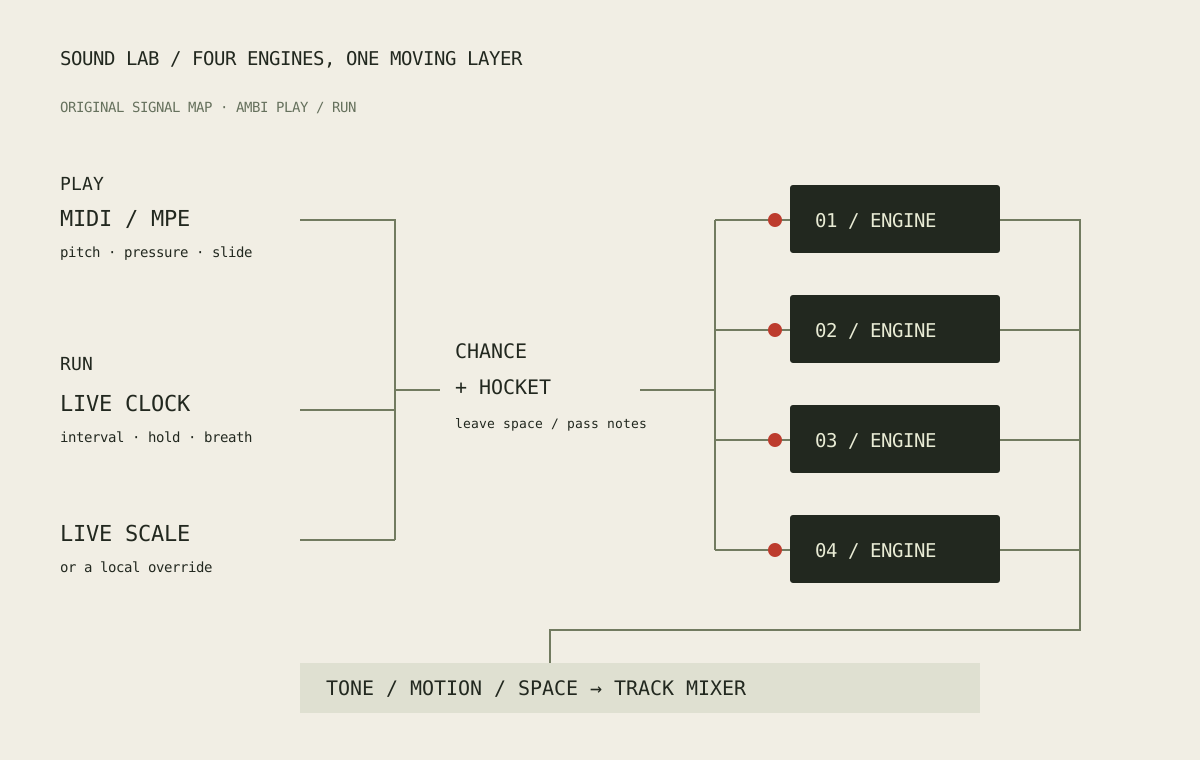
Play takes notes from a controller or MIDI clip. Run generates an ambient layer using the selected Clock. Choose an interval, leave some opportunities silent with Note %, then decide how much each new event may change. The four engine switches let you build a layer gradually.
- Ambi-Human: choir, breath, reed and pulse. Start with a low breath level and let the reed provide occasional edges.
- Ambi-Dark: Undertow, Hollow, Bowed and Dust form a darker, weightier voice. Keep one engine exposed before bringing in the rest; long tails can accumulate.
- Ambi-Hell: Furnace, Siren, Rupture and Ash supply more abrasive material. Reduce Drive before raising output, and use Note % to give attacks room.
- Ambi-Pleasure: Glass, Silk, Halo and Bloom make a softer, brighter layer for sustained harmony and moving detail.
- Ambi-Machine: Motor, Ratchet, Coil and Gears. Electrical hum and resonant movement, with rhythmic machinery available when you open the shorter engines.
On Engines, select an engine to see its level, colour, body, motion and chance controls at a useful size. Flow brings together the note choices: Interval sets the opportunity rate, Hocket distributes events between engines, Change % decides how often pitch changes, and Leap steps bounds the movement. Hold sets the duration relative to the clock. Attack, release and glide shape how the layer joins itself together.
Minor / Major weights available colour tones; it does not secretly replace the selected scale. A strict scale still determines the available notes. The Local “Vibe min/maj” option makes both colours available for a more ambiguous layer.
Space contains echo, width, drive and slow breathing. Try Breath bars at four or eight so a swell crosses the smaller note pattern. Lift dB adds up to 12 dB of gain, separate from Output; its new-instance setting is +4 dB. Turn down Output when stacking several layers.
Three ways to make a rhythm
Circuit Twelve: write the pattern
Twelve original drum voices with a compact drum-machine workflow: Kick, Snare, Low and High Tom, Rim, Clap, Closed and Open Hat, Conga, Clave, Shaker and Cowbell. Select a pad to audition it and edit its level, tuning, decay, tone, body and pan. Closed hat chokes open hat.
Choose Sequence to edit the selected voice’s sixteen velocity steps. Zero is a rest. Every voice retains its own pattern. Set the device to Run and press Live Play, or choose Free. Groove provides swing, accent, density and seed. Incoming MIDI triggers the voices in both Play and Run.
The main MIDI notes, in the order above, are 36, 38, 41, 45, 37, 39, 42, 46, 64, 75, 70, 56. These are note numbers, avoiding octave-label differences. This is a standalone instrument: it does not present itself as a native Drum Rack or promise Push’s sixteen-pad Drum Rack layout. Its named device banks expose each voice, the selected voice’s steps and voice enables.
Hand Current: leave room between strikes
Skin, Wood, Brush and Bell form a tuned percussion layer. Run uses Interval, Note %, Hocket and pitch changes within Live’s scale. Human adds bounded timing offsets; Ghost adds softer touches. Newly generated strikes follow a scale change, while an already-ringing strike keeps its pitch.
The four pads use MIDI 36, 38, 40, 41. Other notes rotate between engines at the played pitch. Voices exposes the selected engine’s tone, decay and body; Space adds echo, softness, drive and accent. Start with one short Skin voice, then introduce Wood at a lower chance.
Ripple Strike: interlock different cycles
Pebble, Tin, Wood and Water are percussion textures, with independent Hits and Cycle counts. The lanes repeatedly meet and separate. Pour introduces rolls; Trail limits their repetitions; Tide swells the density; Evolve can rotate a lane at a bar boundary. Tuning changes the texture’s colour rather than creating a scale melody.
Begin with Pour around 0.2 and Trail at one. Add density before adding more repeats. Spread opens the stereo image. The voice switches remain available on each page so you can quickly thin a busy result.
What changed in this build: the three drum instruments have more definite attacks and shorter noisy/upper-partial tails. Decay describes the fall towards silence more consistently. A short handover is applied when retriggering an audible voice; a fresh hit keeps its attack. Hand Current and Ripple Strike also use a less persistent echo. Saved levels stay unchanged; new-instance Output is −3 dB for Circuit Twelve and Ripple Strike, and 0 dB for Hand Current.
Meter limit: the internal drum and fracture patterns use sixteen steps across four quarter notes. Changing Live’s time signature does not resize that pattern.
Bar Fracture: interrupt a drum phrase
Place this audio effect after drums. It captures recent stereo audio and changes the way that audio is read across sixteen clocked steps. It needs a short slice of incoming sound before a repeat is available; it cannot rearrange audio from the future.
Pattern uses your written step choices. Chance generates choices. Hybrid varies the written pattern. A step can be Dry, Repeat, Flip, Choke, Half, Double, Crush or Scatter. Repeat size sets the fragment length; Mild / Wild increases the disruption. Chance % leaves some steps untouched, while Fill every raises the processing probability at the chosen bar interval.
Start with 25% Dry/Wet and one Repeat near the end of the bar. Add a Flip on another step before increasing Wild. Feedback recirculates captured material; Tone and Drive change its edge. Stereo changes width without the old fixed channel offset. Edge smoothing crossfades discontinuities without repeatedly dipping the whole slice to zero.
This revision repairs a Crush sample-hold fault that could produce silence. At Dry/Wet zero, the effect passes the dry signal at unity. Clear invalidates the capture history; the Transport clock returns towards dry on Stop. The output has a soft ceiling, not a look-ahead master limiter.
Fast Bass: play, sequence or arpeggiate
Soft, Hard, Acid and Sub are starting behaviours for a mono instrument with last-held-note priority, legato and glide. Sound puts wave blend, sub, resonant filter, filter envelope, decay and drive together. Acid becomes useful when Filter, Resonance and Env > filter work together; accents and slides add movement to the phrase.
Play follows incoming notes. Sequence runs the internal sixteen-step pattern and lets you play over it. Arp uses the chord you hold; Latch retains it after release and a new chord replaces it. Arp keeps the pitches you actually play. Sequence uses Live’s scale by default.
On Pattern, the lower dials set velocity; zero rests. Select a numbered step to edit its degree, gate, slide and accent. Rate, length, direction, chance and swing shape playback; Arp adds its own octave range. On Push, the Edit Step bank follows your selected step, with separate velocity banks.
Twelve starting sounds: Soft foundation, Felt sub, Round electric, Rubber, Dub cushion, Hard edge, Reese pulse, Torn speaker, Acid line, Liquid acid, Hollow square and Night pulse. Choosing one changes timbre controls while retaining the pattern, playback mode, tuning and output. Load reapplies that starting sound; save your subsequent edits in the Set.
Stringfield: blend bow, pad and key
An eight-voice MPE instrument with three freely mixed layers. Strings adds bow-like harmonic movement, Pad adds slowly moving partials, and Keys adds a velocity-sensitive FM strike. These are synthesized textures rather than acoustic recordings.
Sound holds the layer levels, body, tone, attack, release and motion. Shape adds key decay, detune, key colour, glide and Pluck; Pluck gives the string layer a decay instead of a sustain. Space holds width, room, echo, feedback and drive. Poly keeps voices independent; Mono returns to a previously held note.
Twelve starting sounds cover Bowed ensemble, Slow strings, Solo cello, Soft felt, Glass tines, Dust piano, Reed keys, Air pad, Warm chorus, Frozen choir, Plucked strings and Signal garden. Stringfield plays the MIDI pitches it receives: it does not quantize expressive bends. Use Push’s scale layout or a scale-aware MIDI source when you want a scale-constrained performance.
One musical direction, with local exceptions
Ambi, Hand Current and Fast Bass’s sequence default to Live tuning. They read Live’s actual root and interval list, rather than approximating unfamiliar scales. Choose Local on a device to keep an independent root and mode, then return to Live to rejoin the others. Ambi’s generated held layers retune smoothly without restarting the clock.
Why does C major sometimes return? Live’s transport scale chooser reflects the currently or most recently selected clip. Changing it does not rewrite every other clip’s saved scale. Selecting an older C-major clip can therefore bring C major back. For a common scale, select the relevant clips together and set their scale. This changes scale metadata; it does not transpose their existing MIDI notes. See Ableton’s scale guide.
The companion core device package now defaults its scale-aware instruments and MIDI processors to Live too. It also repairs switching Local off and Live back on when Live’s key has not changed. Existing saved manual overrides remain intact.
For MPE, match the controller’s member bend range to the device. Lower zone is the default; Expression offers Upper and ordinary MIDI. Per-note pitch, pressure and CC74 slide have separate roles. Ordinary MIDI, a clip or the audition controls still work without an MPE controller. Release stops an audition note; Panic clears held notes. On Fast Bass, Panic also returns to Play so the internal sequence/arp stops.
A sixteen-bar performance to try
- Start Live at a comfortable tempo. Set the clips you plan to select to the same key and scale. Load Ambi-Machine, Hand Current, Fast Bass and Stringfield on separate MIDI tracks.
- Run Ambi-Machine with a one-bar interval and round hocket. Keep Motor low and bring Ratchet in slowly. Set breathing to eight bars.
- Run Hand Current with only Skin and Wood enabled. Lower Note % until you hear space around each strike. Keep echo low for the first pass.
- Use Fast Bass Sequence for a sparse four-note phrase. Open the filter over eight bars, then add two accents. Play a slow Stringfield chord above it.
- Record a pass. Change the common scale for the next pass, then give only Ambi-Machine a Local override. Compare the shared movement with one layer holding its own direction.
For a rhythmic alternative, put Bar Fracture after Circuit Twelve and change only the last four steps of the bar. Record one restrained pass and one full-wet pass. Share a mix or a work-in-progress note through contact Mark.
What has been checked
Native Max audio checks cover the drum attacks/tails, running patterns, Panic, dry unity and all seven Bar Fracture operations. Earlier native checks cover the bass/string starting sounds and note handling. Controller regressions cover MPE ownership, scale following and saved-state restoration. The new performance wrappers are checked by loading them in Windows Live and exercising their actual mapped parameters.
These checks establish specific behaviour, not musical approval or a long-session hardware benchmark. Physical Push listening, controller feel, macOS and sustained standalone CPU use remain open. Start with a few active layers and expand the Set after hearing how it behaves on your setup.